Start with five
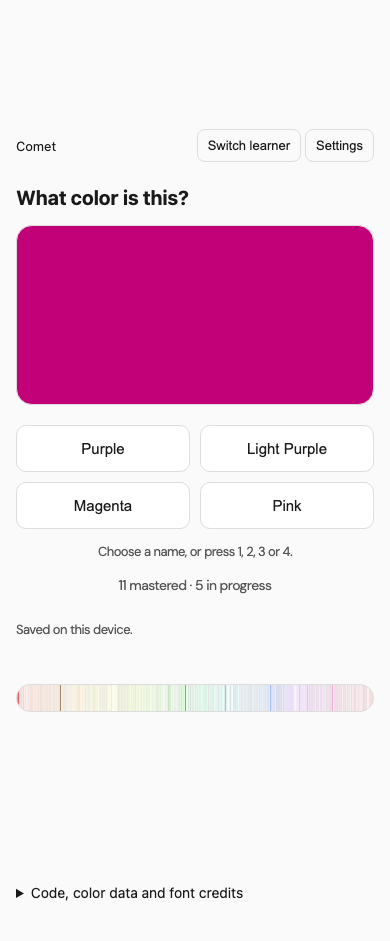
Eleven familiar colors begin as known. Five new ones enter practice, with four names to choose from each time.
Colors · Free & open source
You know the color when you see it. Now learn what to call it. Practice five shades at a time, build a streak, and watch your spectrum fill in.
949 colors · No account needed · Works on phones and computers
Eleven familiar colors begin as known. Five new ones enter practice, with four names to choose from each time.
Three correct answers in a row master a color. A miss resets that color’s streak, and weaker colors get more practice.
Your spectrum brightens as you learn. Keep separate learners in one browser, and export a backup whenever you like.
A little practice, whenever
Tap a name, or use the 1–4 keys on a keyboard. Come back to the same browser and choose Continue as… to pick up where you left off.
This copy saves on your device. In Settings, choose Export progress to save a backup, or Import progress to bring one back. Clearing browser data can erase local saves.
The complete xkcd survey includes informal and profane color names. This is a color-vocabulary game, with an unscreened vocabulary, rather than a preschool course or vision test.
Keep it, use it, share it
For the easiest start, press Play now. On a computer, you can also keep the whole game in a single file. That copy works without an internet connection.
Phone? The Play now link is usually easier. Your downloaded copy and this website keep separate saves; Export and Import let you move progress.
Built for me. Yours to adapt.
I built this for my own personal use, around the way I like to learn things. Make it your own, and feel free to improve mine. Hopefully it gives you a useful starting point, or at the very least some ideas. Cheers!
The complete app, teaching logic, design notes, and an AI-assistant adaptation skill are on GitHub. There’s also an optional cloud-save setup for people who want to host their own version and sign in across devices.
The code uses the MIT license: use, change, share, or sell your version, keeping the notice. The dataset, font, and dependencies keep their own notices.
Used the original Colors game here? Your original game is still available. This new version starts separately.